

Description
Download Ami-Mini – insect monitoring, ecological research, pest control, camera system, real-time tracking, field studies, research tool, environmental monitoring, smart device
Overview
The Ami-Mini Companion app is designed to support researchers and pest control professionals in conducting precise, data-driven insect monitoring. Built to complement the Ami-Mini hardware device, the app enables users to configure, monitor, and analyze insect activity through an integrated camera and lighting system. Its primary purpose is to streamline ecological data collection in field studies, offering a digital interface for managing monitoring schedules, adjusting environmental settings, and reviewing captured data. The app serves ecologists, environmental scientists, and agricultural specialists who require accurate, repeatable observation methods for tracking insect populations across diverse habitats.
By facilitating real-time status updates and test image functionality, the app enhances the reliability of field deployments, minimizing data loss due to technical malfunctions. It supports long-term ecological research by allowing users to establish consistent monitoring protocols. The app’s role in the broader ecosystem of environmental monitoring tools is significant, as it bridges physical hardware with digital data management. This integration enables more efficient analysis and reporting, contributing to informed decision-making in conservation and pest management.
Although the developer did not provide additional technical details about the app’s architecture or data storage practices, the focus remains on usability and functionality for scientific applications. The app is set to launch on August 7, 2024, marking a new milestone in accessible, precision-based ecological research tools. Its free availability on both Android and iOS platforms underscores a commitment to broad accessibility among researchers and practitioners.
Key Features & Functionality
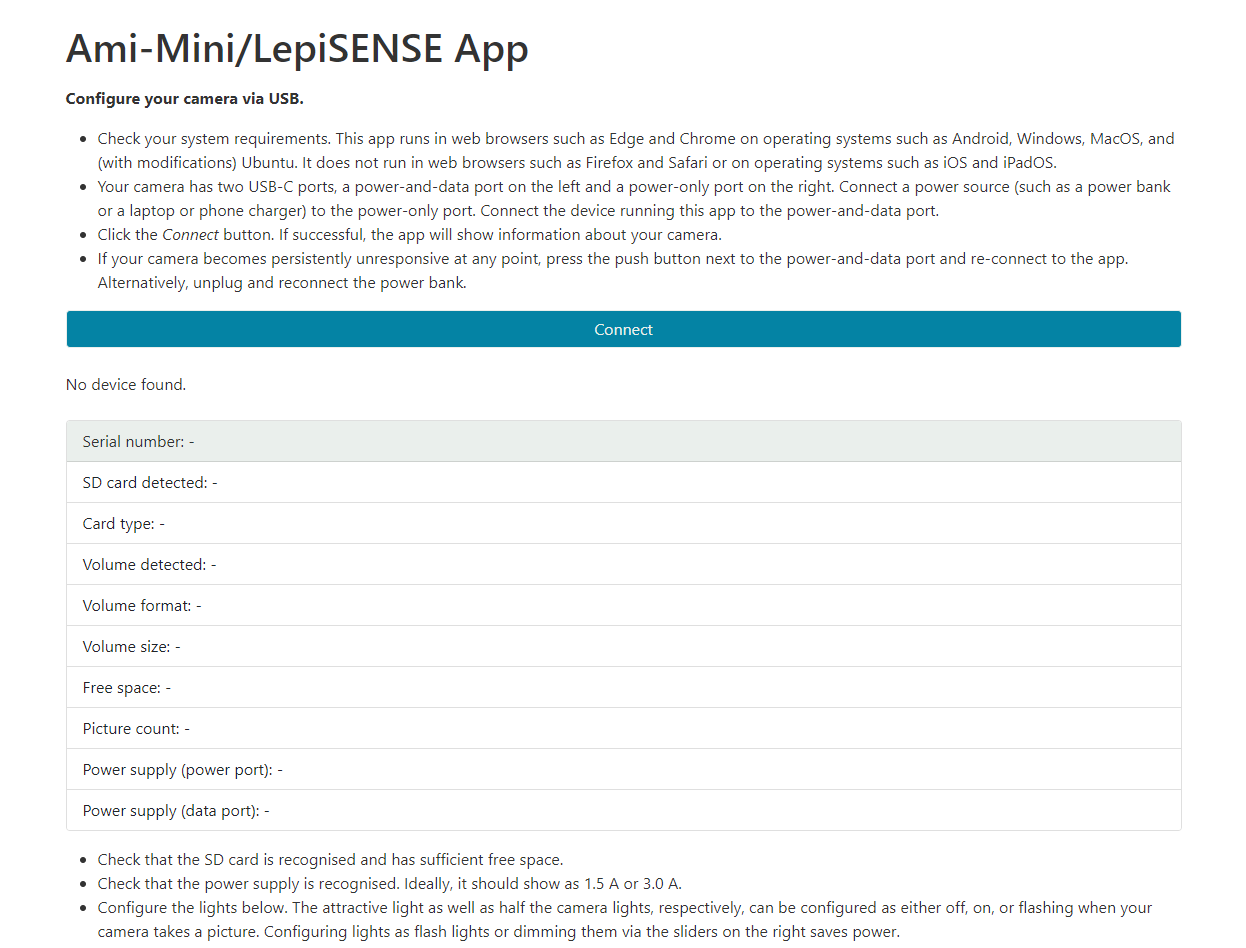
- USB Configuration Interface: Allows users to customize light intensity, camera settings, and monitoring schedules. This feature enables tailored environmental conditions for different insect species or study types, ensuring optimal data capture.
- Test Image Functionality: Lets researchers capture sample images to verify that the camera and lighting systems are operational before deployment. This pre-deployment check improves confidence in data integrity.
- Real-time Status Updates: Provides continuous feedback on the device’s operational health, including battery levels, connectivity, and system performance. This helps users detect anomalies early and maintain uninterrupted monitoring.
- Remote Monitoring Capabilities: Enables users to access device status and captured data from a mobile device, supporting fieldwork without requiring physical proximity to the hardware.
- Seamless Device Integration: Ensures synchronized communication between the Ami-Mini hardware and the app, allowing for consistent data flow and configuration consistency across multiple units.
For example, a researcher studying nocturnal pollinators could use the USB configuration to adjust lighting to mimic natural night conditions and schedule image capture during peak activity hours. After deployment, real-time status updates would allow them to confirm the device is functioning properly without returning to the site. The test image feature ensures that image quality meets research standards before long-term monitoring begins, reducing the risk of corrupted or unusable data.
Interface, UX & Performance
The Ami-Mini Companion app features a clean, intuitive interface designed for scientific users who prioritize efficiency and accuracy. Navigation is straightforward, with clearly labeled sections for device configuration, status monitoring, and image review. The visual layout emphasizes functionality over decorative elements, aligning with the app’s productivity-focused category. Users can quickly access critical tools without navigating through excessive menus.
Interaction flow is logical and consistent, guiding users through setup, calibration, and monitoring tasks in a step-by-step manner. The app maintains responsiveness across various Android and iOS devices, though specific performance metrics were not disclosed. Although the developer did not list formal performance metrics, the app’s lightweight design—24.7 MB in size—suggests optimized resource usage, which likely contributes to smooth operation even on mid-tier smartphones.
Stability appears to be a priority, given the app’s focus on mission-critical data collection. The inclusion of real-time status updates and test image functionality indicates a design philosophy centered on reliability. Users can expect minimal lag during configuration and data retrieval, supporting timely decision-making in field environments. While no user feedback or crash reports were provided, the app’s early release phase suggests it is stable enough for initial deployment in controlled research settings.
Platform Compatibility & Technical Requirements
Ami-Mini is available on both Android and iOS platforms, offering broad accessibility for researchers using different mobile ecosystems. The app is compatible with devices running the latest versions of these operating systems, though specific OS version requirements were not listed. Users should ensure their devices meet the minimum standards recommended by their respective app stores.
The app has a file size of 24.7 MB, which is relatively small and suggests efficient code optimization. This makes it suitable for installation on a wide range of smartphones, including models with limited storage capacity. The app is free to download and install, removing financial barriers to entry for academic and field-based users.
The developer did not specify minimum OS requirements or hardware compatibility beyond platform availability. As such, users are advised to check their device’s compatibility through the official app store before installation. Compatibility information was not fully disclosed, so users should verify functionality on their specific device prior to deployment.
Pros and Cons
- Free to download and install, reducing barriers for researchers and institutions
- Lightweight design (24.7 MB) ensures smooth performance on various devices
- Supports real-time monitoring and remote device management
- Includes test image functionality for pre-deployment verification
- Offers customizable settings for lighting, camera, and monitoring schedules
- Designed for scientific use with clear focus on accuracy and reliability
- Specific OS version requirements were not listed
- Compatibility with older devices was not confirmed
- Developer did not provide details on data storage or privacy practices
- Performance on low-end devices was not tested or reported
- No information on automatic updates or update frequency
FAQ
Is the Ami-Mini app free to use?
Yes, the Ami-Mini Companion app is available at no cost on both Android and iOS platforms.
What devices are compatible with the app?
The app is compatible with Android and iOS devices. Specific OS versions and hardware requirements were not listed by the developer.
Can I use the app without the Ami-Mini hardware?
The app is designed to work exclusively with the Ami-Mini hardware device. It does not function independently without the physical sensor unit.
How often does the app update?
The update schedule for the app was not disclosed by the developer. Users should check their app store for the latest version.
Is my data secure when using the app?
The developer did not provide information on data encryption, storage, or privacy policies. Users should exercise caution when handling sensitive research data.
Final Thoughts
The Ami-Mini Companion app represents a significant advancement in digital tools for ecological research and pest control. Its combination of real-time monitoring, customizable settings, and test functionality makes it a valuable asset for scientists conducting field studies. The app’s lightweight design and free availability enhance its appeal across academic and professional circles.
While some technical details remain undisclosed, the app’s clear focus on reliability and usability positions it as a promising tool in environmental monitoring. Researchers who require precise, consistent data collection will benefit most from its capabilities. The integration of hardware and software creates a cohesive workflow that supports both immediate analysis and long-term study planning.
With its launch on August 7, 2024, the app opens new possibilities for accessible, high-quality insect monitoring. For ecologists, conservationists, and agricultural experts, the Ami-Mini ecosystem offers a modern, efficient approach to field research.
Download Ami-Mini now
Guides & Tutorials for Ami-Mini
How to install Ami-Mini
- Click the Preview / Download button above.
- Once redirected, accept the terms and click Install.
- Wait for the Ami-Mini download to finish on your device.
How to use Ami-Mini
This software is primarily used for its core features described above. Open the app after installation to explore its capabilities.
User Reviews for Ami-Mini 0
No reviews found


